CRM software: how to choose the right CRM in 2026
CRM software brings your customers, messages, quotes and follow-ups together in one place. This guide covers what it does, which features you really need, the types of CRM, 12 criteria to ask about when choosing one in Turkey, and an honest comparison of popular CRM products. At the end, we show you real screens from our own product — limits included.
Short answer: what is CRM software?
CRM software (customer relationship management software) is software that gathers all the information a business has about its customers in a single shared database — contact details, WhatsApp and Instagram messages, call notes, quotes, appointments, orders and payments — and helps your team follow up with every customer systematically. The right CRM software gives you three things: customer history belongs to the business, not to individuals; requests and follow-ups stay visible through reminders; and you can measure which channel brings in sales. When choosing, look at this before the price tag: where do your customers message you from, and does the CRM support that channel natively?
No credit card required · No setup fee · Support in Turkish
What is CRM software?
CRM stands for Customer Relationship Management; in Turkish it is müşteri ilişkileri yönetimi. As a concept, it describes a way of working: organizing the business around the customer rather than around the product or department. CRM software is the tool that brings that way of working into daily operations. The basic logic is simple: every customer has a single record, and everything that happens with that customer — messages, calls, quotes, appointments, payments — is linked to it.
Ayşe asks about prices on Instagram, writes on WhatsApp two days later, books an appointment by phone and pays a deposit. In a business without a CRM, these four events live in four separate places: one team member's Instagram account, another person's phone, the notebook on the desk and the accounting team's Excel file. In CRM software, all four appear on Ayşe's record in chronological order — and whoever opens it sees the same picture.
CRM program, CRM software, CRM system: is there a difference?
In searches and quote documents, the same product goes by different names. A short glossary:
- CRM software
- The most common name in Turkey; from the user's point of view, “the app I open every day.”
- CRM software
- The name for the same product category in technical and corporate texts. Functionally, it is the same as a CRM program.
- CRM system
- It also covers the processes around the software: who does what, in which situation; which field is required; within how many days follow-up happens.
- Customer management software
- The everyday equivalent. It usually describes the same need; sometimes it is used only for simpler tools that hold a customer list and reminders.
- Cloud CRM (SaaS)
- A CRM that needs no server setup, is used from a browser or phone, and is sold as a subscription. Most CRMs used by SMBs today follow this model.
In short, there is no functional difference between a “CRM program” and “CRM software”; in this guide we use the two as synonyms. For the background and theoretical framework of the concept, see our article What is CRM? CRM software types and benefits.
What does a CRM program do? A workday with and without CRM
It is easy to describe the benefit of CRM with abstract “efficiency” sentences; to see it concretely, let's live the same workday twice:
| Situation | Without a CRM program | With a CRM program |
|---|---|---|
| A new customer sends a message | The message stays in the pocket of whoever happens to be checking the phone that day. | It lands in the shared inbox, is tagged by source (Instagram, WhatsApp, ad), and is assigned to a sales rep. |
| A quote is sent | Someone says “we'll get back to you”; nobody puts it on the calendar. | The quote sits on the card; its status (sent, approved, revised) and the follow-up reminder are visible. |
| The customer writes again three months later | “Had we spoken before?” | The previous conversation, the price you gave and your notes, all at a glance. |
| A team member is on leave or has left | The customer history leaves with them. | The history stays with the business; customers are handed over to another sales rep. |
| End of the month: “Which ad worked?” | Guesswork and debate. | A report of leads, sales and revenue by channel and campaign. |
| Appointment and payment day | Left to the planner and to memory. | Reminders, due-date tracking and an outstanding-items list. |
The summary of the table is this: the real benefit of a CRM program is not “keeping records” but taking forgetting out of the system. A large share of sales close not on first contact but on later follow-ups; and follow-up only happens regularly when no one has to remember to do it. We also cover the invisible cost of missed follow-up in our benefits of using CRM section.
Who uses a CRM program?
Not just sales teams. Any business that contacts its customers more than once benefits from CRM: clinics and beauty centers that work by appointment, real estate offices that match listings with buyers, auto service shops that keep vehicle history, education institutions with enrollment periods, insurance agencies that track policy renewals, e-commerce companies that sell again, consultants and agencies. What they have in common: the customer does not just come and go — the relationship stretches over time — and anything that stretches over time is easy to forget.
Features a CRM program should have
Feature lists go on and on; to make the decision easier, we split them in two: the core features every CRM program should have, and the differentiators that in 2026 set a good CRM apart from an ordinary one.
The 7 must-have core features
Customer record (360° view)
Contact details and the full interaction history on one screen. This is the heart of CRM; everything else feeds this record.
Lead management
Where did the lead come from, who was it assigned to, what stage is it at? Why did leads that didn't convert come back?
Sales pipeline
Visual, stage-by-stage tracking of opportunities: which quote is waiting where, what amount is expected to close this month?
Tasks and reminders
The “call on Tuesday” note lives in the system, not on paper — and is reminded on time.
Reporting
Numbers by channel, sales rep and period. Without reports, a CRM is no different from an address book.
Role and permission management
Who sees which customer, who can export, who can delete? It is both a governance and a KVKK (Turkey's personal data protection law) matter.
Data import and export
Being able to start from Excel and, when needed, take your data and leave. The second is the least-asked but most important question.
The 5 features that make a difference in 2026
Messaging channels inside the CRM
In Turkey, customers write via WhatsApp and Instagram, not email. If the channel stays outside the CRM, the conversation stays outside too.
AI that actually helps
Sorting messages as hot/urgent/complaint, summarizing the conversation, suggesting a reply. Not an "AI-powered" label — less work.
Appointments, quotes and payment collection in one product
When copying and pasting between separate tools stops, your data stays consistent too.
Connecting ads to sales
See your Meta and Google spend next to leads, customers and revenue; manage your budget by results, not guesswork.
Chatbots and automation
Flows that give the first reply outside business hours, collect the information you need and hand the work to your team in the morning.
Not every business needs all of it. For a one-person consultant, a customer record and a reminder may be enough; for a clinic with ten people, channel integration and role permissions become essential. Write down your list of needs before you look at a product list.
Types of CRM: by function, deployment and industry
3 basic types of CRM by function
Operational CRM
Runs and automates sales, marketing and customer service processes: lead assignment, follow-up reminders, quote flow. This is what most small and medium businesses need.
Analytical CRM
Makes sense of the data you accumulate: segments, customer value, loss reasons, channel performance. It moves you from “What happened?” to “Why did it happen?”
Collaborative CRM
Shares information across departments and channels: the support team knows what sales knows, and the customer never has to explain the problem from scratch again.
Most CRM software today combines all three types in one product; the types now describe the focus of a product rather than separate products. Some sources also add strategic CRM, which centers on long-term customer strategy.
By deployment: cloud or on-premise?
| Criteria | Cloud CRM (SaaS) | On-premise CRM |
|---|---|---|
| Starter | You create an account and start using it the same day. | It requires a server, installation and a configuration project. |
| Cost structure | Monthly or annual subscription. | License + hardware + maintenance + IT staff. |
| Updates | By the provider, automatically. | By you, often at extra cost. |
| Access | From a browser, from anywhere. | Usually over the office network or a VPN. |
| Data and security | On the provider’s infrastructure; subject to the contract and KVKK (Turkey’s personal data protection law) provisions. | On your own server; security and backup are your responsibility. |
| Best for | Most small and medium businesses, and distributed or field teams. | Organizations with special regulations or isolation requirements and an IT team. |
General or industry-specific?
A general CRM fits any business, but you adapt it to yours: you set up the fields, stages and reports from scratch. An industry-specific CRM comes with ready-made fields and flows: a treatment plan and follow-up appointment in a dental clinic, a property portfolio and buyer matching in real estate, vehicle history and maintenance reminders in an auto service center. A good approach is a solid general core with industry-specific setup on top. ÖzgürKod follows this path and offers scenarios prepared for more than 260 industries:
Do you need CRM software? A quick 8-question test
Let’s be honest: not every business needs CRM software today. Check the eight situations below that are true for your business; the result appears instantly below.
Which of these are true for your business?
No data is sent anywhere; the calculation runs in your browser.
The result appears here as you check the boxes.
- 0–2 signals: For now, a well-organized Excel list and calendar reminders may be enough. Take this test again as your business grows.
- 3–5 signals: A CRM program saves you time every week and brings back follow-ups that slipped through. Start with a simple cloud CRM that is quick to set up.
- 6–8 signals: Lost customers most likely cost more than a CRM subscription. A CRM program with channel integration and team permissions should be your priority.
12 criteria for choosing CRM software in Turkey
Global “best CRM” lists skip half of these criteria, because half are specific to Turkey: the weight of WhatsApp, TL pricing regulations, KVKK (Turkey's personal data protection law) and Turkish-language support. You can copy the list below and ask vendors about it point by point.
CRM selection checklist
For transparency, we also wrote our own status under each criterion — including the ones where we said “no.” Tap “ÖzgürKod status” to hold us to the same list.
-
Where do your customers message you from, and does the CRM support that channel natively? In Turkey, customers mostly write via WhatsApp and Instagram, not email. If the channel stays outside the CRM, both the conversation and the customer history stay outside too.
ÖzgürKod status
Native: WhatsApp (official Cloud API + QR, multiple numbers), Instagram DM and comments, Facebook Messenger, Telegram, TikTok DM, web chat, and forms in a single inbox.
-
Are the interface and support in Turkish? A CRM your team does not use is the most expensive CRM. An English interface and support only through a portal are the most common reasons adoption slows down.
ÖzgürKod status
The interface is in Turkish, and Turkish-language support by phone and WhatsApp is free on all plans. Messages from customers writing in another language are translated automatically, and you can reply with ready-made templates in 8 languages.
-
Pricing model: per-user USD, or a flat TL plan that covers the team? With per-user pricing, your bill grows along with your team and exchange rates. Run the comparison using your team size 12 months from now and the 3-year total.
ÖzgürKod status
A flat TL plan with users included and no setup fee. Connecting a WhatsApp number is priced separately (₺15,000 per number per year plus VAT).
-
Is your entire day-to-day work in one place: appointments, quotes, payment collection, tasks, inventory? If you choose a CRM that only manages the sales pipeline, you will need separate tools for appointments, quotes and payment tracking — and copy-paste between them.
ÖzgürKod status
Leads and pipeline, online appointment scheduling (synced with Google Calendar), PDF quotes, installment payments and due-date tracking, task management, a product and service catalog, and inventory are all in the same plan, with no per-module fee.
-
Who does the setup, how long does it take, and is there a fee? With products that need a “setup project,” consulting fees often exceed the license cost. With cloud products, the real work is data migration and getting the team into new habits.
ÖzgürKod status
Cloud-based (SaaS), so there is no server to set up. Our support team helps you free of charge with importing customers from Excel and with team training; connecting channels takes minutes.
-
Where is the data stored, and who can access it? (KVKK) Ask the vendor: what infrastructure holds the data, what is the legal basis for any transfer abroad, are accesses logged, and who has permission to export?
ÖzgürKod status
Each business’s data is stored in a separate (isolated) database. There is role-based permission, a “staff see only their own customers” rule and access logs; exports require SMS verification and the company owner’s permission.
-
How is work distributed and permissions managed within the team? When several people watch messages coming in on the same channel, “who answers this?” is a question the system should answer.
ÖzgürKod status
Incoming messages can be assigned to sales reps in round-robin order; visibility per person and role-based access are defined; and a customer can be handed off to another sales rep when needed.
-
Do reports connect ad spend to sales? “How many messages came in” is not enough; unless you can see which campaign brought how many customers and how much revenue, you are managing your ad budget on guesswork.
ÖzgürKod status
Meta and Google ad spend sit on the same dashboard as leads, customers and revenue, with sales reports by channel, sales rep and period.
-
Does the AI actually do concrete work, or is it just a label? Don’t look at the words “AI-powered” — look at how much time it saves on daily work: classification, summaries, suggested replies, first response outside business hours.
ÖzgürKod status
It classifies incoming messages as hot, urgent or complaint; generates conversation summaries, intent and suggested replies; and chatbot flows built without writing code give the first response outside business hours.
-
Can it be used from a phone and in the field? If your sales and field teams are not at a desk, your CRM should not be stuck at a desk either. Do not decide without trying the mobile experience.
ÖzgürKod status
The dashboard runs in the browser and is phone-friendly; lists switch to a card view on mobile. No separate installation is needed.
-
Can you take your data and leave? Contract terms, early-exit penalties and the format your data is exported in are the questions least asked when choosing a CRM — and the ones that hurt the most.
ÖzgürKod status
Monthly plans have no commitment, and you can cancel at any time. Your customer list is exported as CSV from the dashboard (with SMS verification and the company owner’s permission).
-
Does it integrate with the tools you use (accounting, e-commerce, calendar)? Accounting and e-Invoice (e-Fatura), e-commerce platforms and calendars are the three areas where a CRM should not stand alone. Write down which one is critical for you from the start.
ÖzgürKod status
There are integrations with Google Calendar, iCloud Calendar and WordPress. An honest limit: there is no e-Invoice (e-Fatura) or accounting module — ÖzgürKod is used alongside your accounting software.
The pricing model criterion also has a legal side: under the regulations, software built in Turkey must be priced in TL, while foreign software qualifies for a foreign-currency exemption. Details are in our CRM pricing models and TL pricing regulations section.
Popular CRM software: a short comparison
Transparency note: ÖzgürKod is built by the team that publishes this guide. So we clearly state what each product is strong at and give the pricing model instead of figures; figures change with exchange rates and campaigns, the model does not.
| CRM | Pricing model | Turkish / local support | Strongest at | |
|---|---|---|---|---|
| ÖzgürKod | Fixed TL package, users included | Built in (Cloud API + QR, multiple numbers) | Turkish interface, phone and WhatsApp support | SMBs selling through WhatsApp/Instagram; appointments, quotes and payment collection in one panel |
| Salesforce | USD per user | With an add-on product or integration | Limited | Enterprise scale, deep customization, a broad ecosystem |
| HubSpot | Free plan + USD per tier/user | On higher tiers / via integration | Limited | Content and email marketing, inbound |
| Zoho CRM | Per user | Via integration | Partial | Value for money, a large app family |
| Bitrix24 | Free plan + fixed package | With connector configuration | Partial, portal-focused | Starting with zero budget, CRM + intranet |
| Pipedrive | USD per user | With plugins | Limited | A clean, visual sales pipeline |
| Monday CRM | USD per seat | Via integration | Partial | Flexible work management with board logic |
| The CRM module of an ERP | License or subscription, in TL | Varies by product | Turkish | Deep integration with accounting and inventory (for those already using an ERP) |
This information is a summary based on manufacturers' public information as of September 2026; products are updated often. For current features and pricing, refer to each manufacturer's official page. The brands mentioned belong to their owners.
One-sentence answer: which one suits whom?
- If you have hundreds of users, deep customization, a budget and an IT team → Salesforce.
- If blog, email and content marketing are central to your business → HubSpot.
- If you want a large app family on a single subscription and you are technically curious → Zoho.
- If you want to start on zero budget and also need an intranet → the free plan of Bitrix24.
- If it is all about chasing a single line of business and simplicity matters → Pipedrive.
- If you already use an ERP and accounting integration is critical → the CRM module of your ERP.
- If your customers message you on WhatsApp and Instagram and you want appointments, quotes and payment collection in one Turkish-language panel → ÖzgürKod.
We cover the strengths and watch-outs of each product one by one in our best CRM software of 2026 guide.
CRM software pricing: a short summary
CRM pricing falls into two main models. In the per-user license model (most global products), entry packages cost about 10–25 USD per user per month, the mid segment 25–100 USD, and enterprise packages 100–500 USD and up; the bill grows with the team and the exchange rate. In the fixed TL package model, a set number of users is included in the package and the budget is predictable. ÖzgürKod uses this second model and starts at around ₺2.500/month; connecting a WhatsApp number is priced separately (₺15,000 + VAT per number per year).
The real cost isn't the license sticker price; it's set by setup, data migration, training, integrations, messaging fees and exchange rate differences. We cover all of these, along with a 3-year total cost of ownership calculator, in our CRM pricing guide. Our current plans are on the pricing page; to see what a CRM can earn you with your own numbers, use the CRM ROI calculator.
Is there a free CRM program? Yes, there is; but free plans are limited in users, records, automation and support, and they move a growing business to a paid tier. Detailed review: Is a free CRM really free?
Moving from Excel to a CRM program in 5 steps
Most CRM projects stall not because of the software, but because the transition is done without a plan. Here's the sequence that works for a small or mid-sized business:
- Clean up the list. Merge duplicate records, standardize phone numbers (leading 0, +90 and spacing chaos make the same person get saved twice), split a single “full name” column into two.
- Decide on fields. Source, status/stage, assigned rep and the service they're interested in are enough for most businesses. Don't create thirty fields on day one; an empty field is noise, not data.
- Import and connect channels. Import your Excel/CSV list, then connect WhatsApp and Instagram. From the moment they're connected, every new incoming message creates its own customer record.
- Set one rule: “If it's not in the CRM, it didn't happen.” Quotes, appointments, promises made — all of it goes on the record. Team habits matter more than the choice of software.
- Measure on day 30. How many leads came in, how many were answered on time, how many turned into sales? The first month's report sets the target for the months ahead.
After you set up your CRM, take a look at the 7 steps in our how to use CRM software the right way guide so your team actually uses it.
What does a CRM program look like in ÖzgürKod?
This guide was prepared by the ÖzgürKod team; it's natural that we show our own product at the end. But we're putting screens instead of adjectives: the images below are real screenshots taken from the panel, with customer data replaced by sample records.
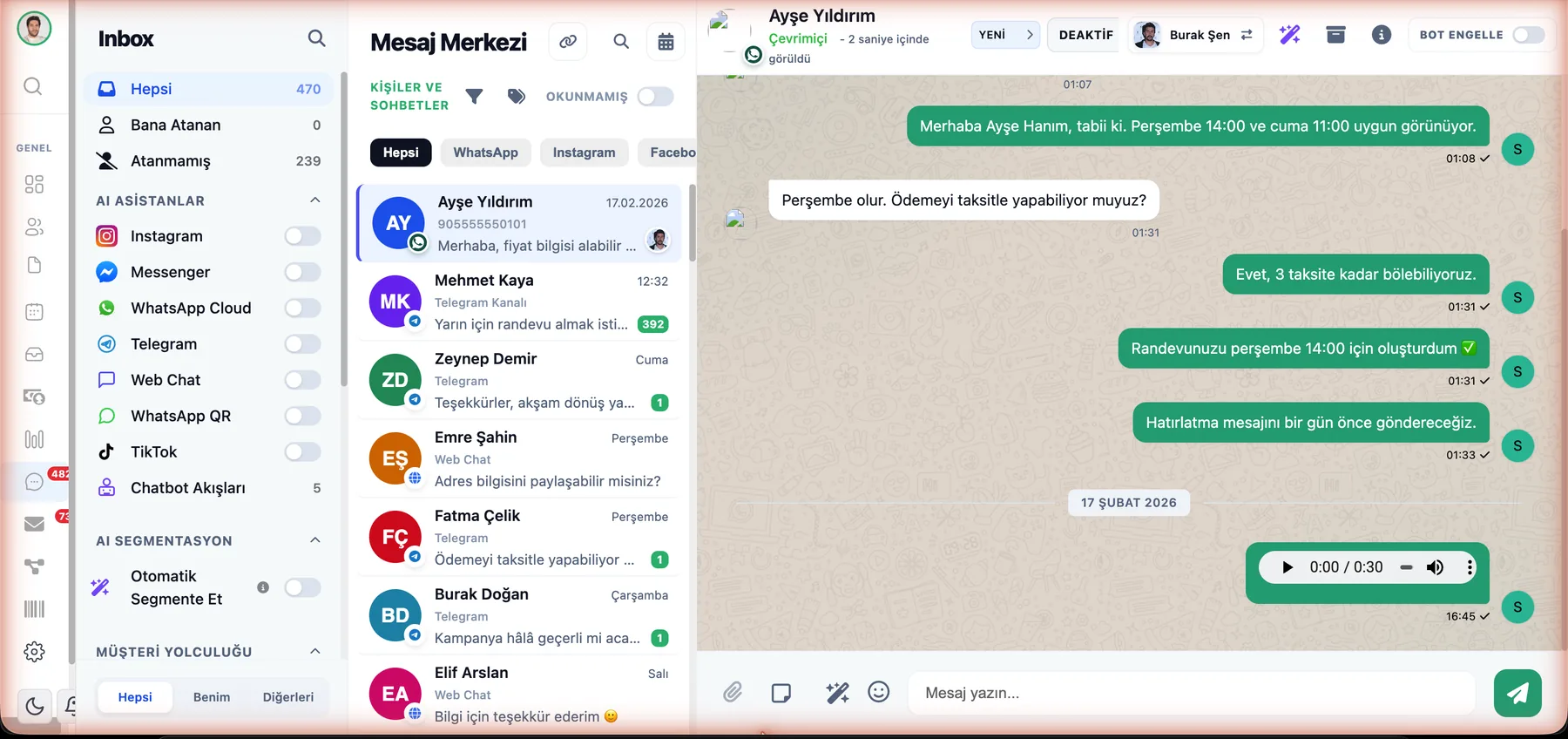
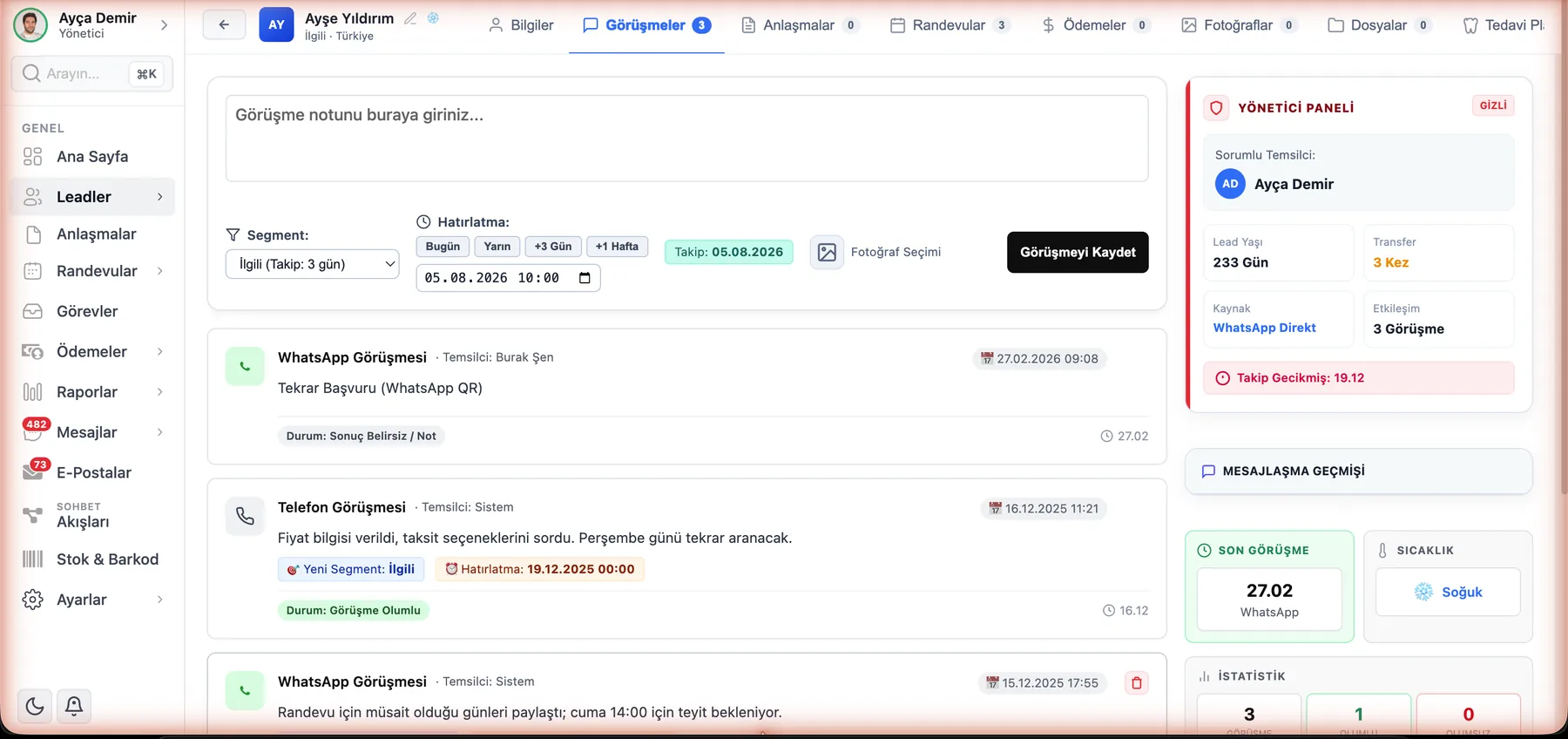
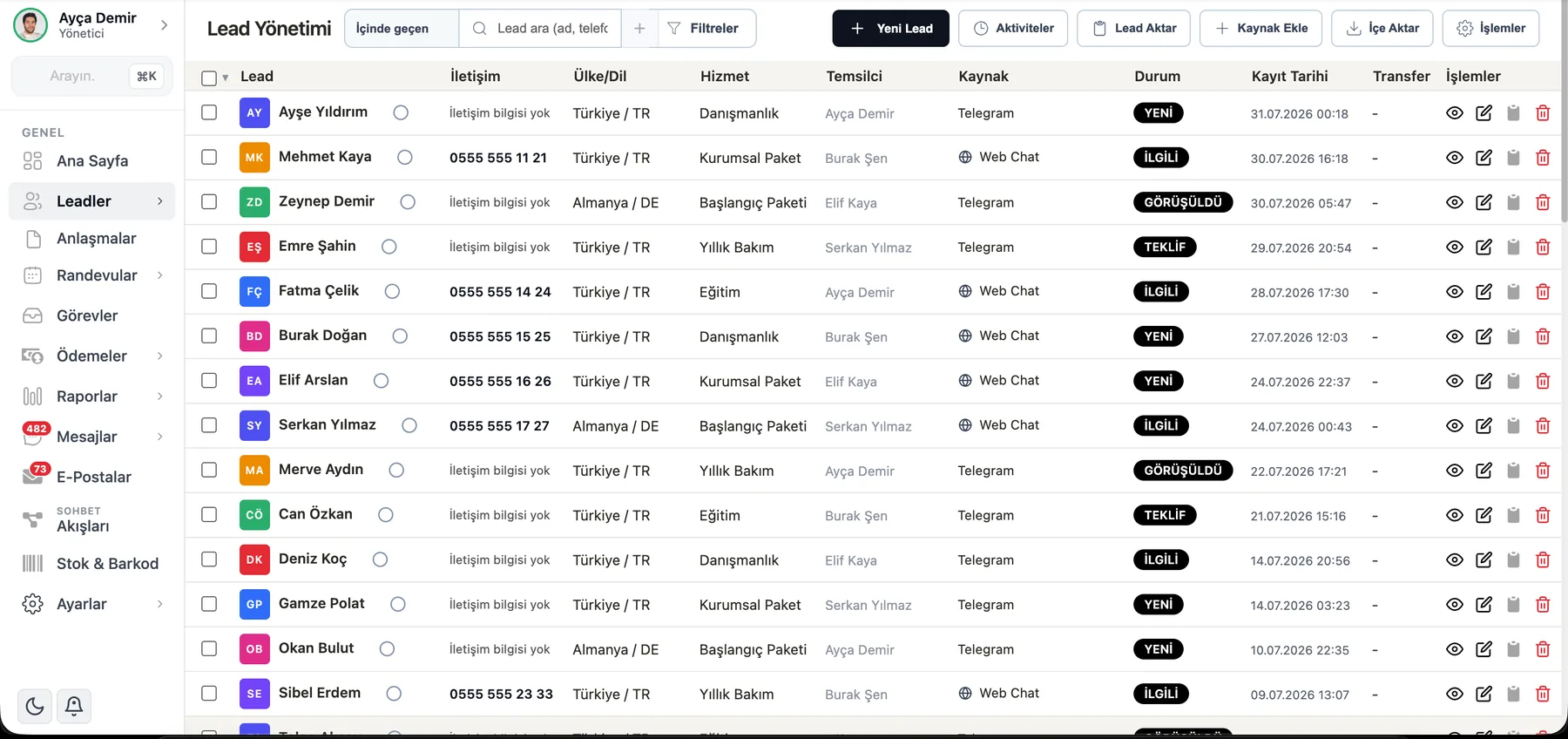
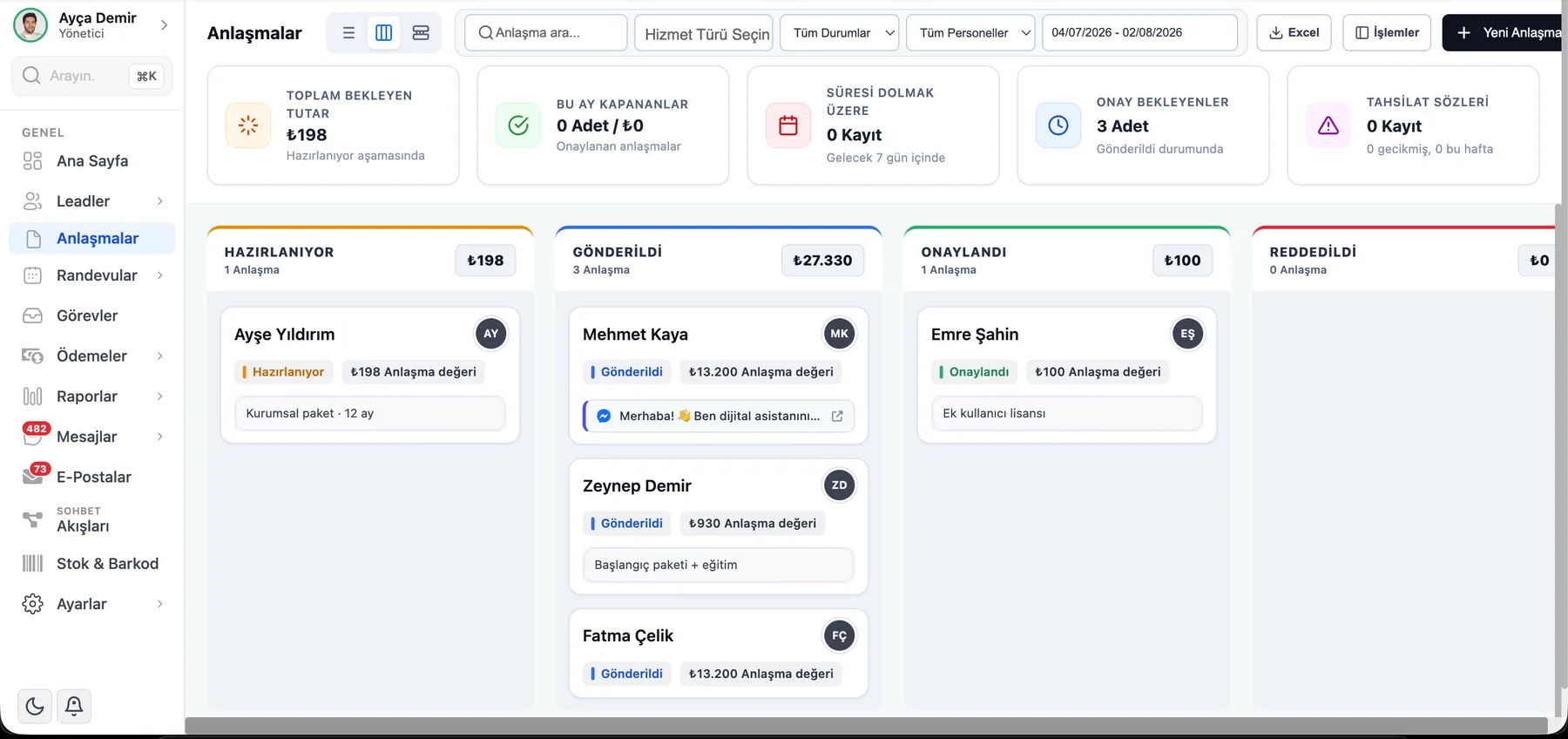
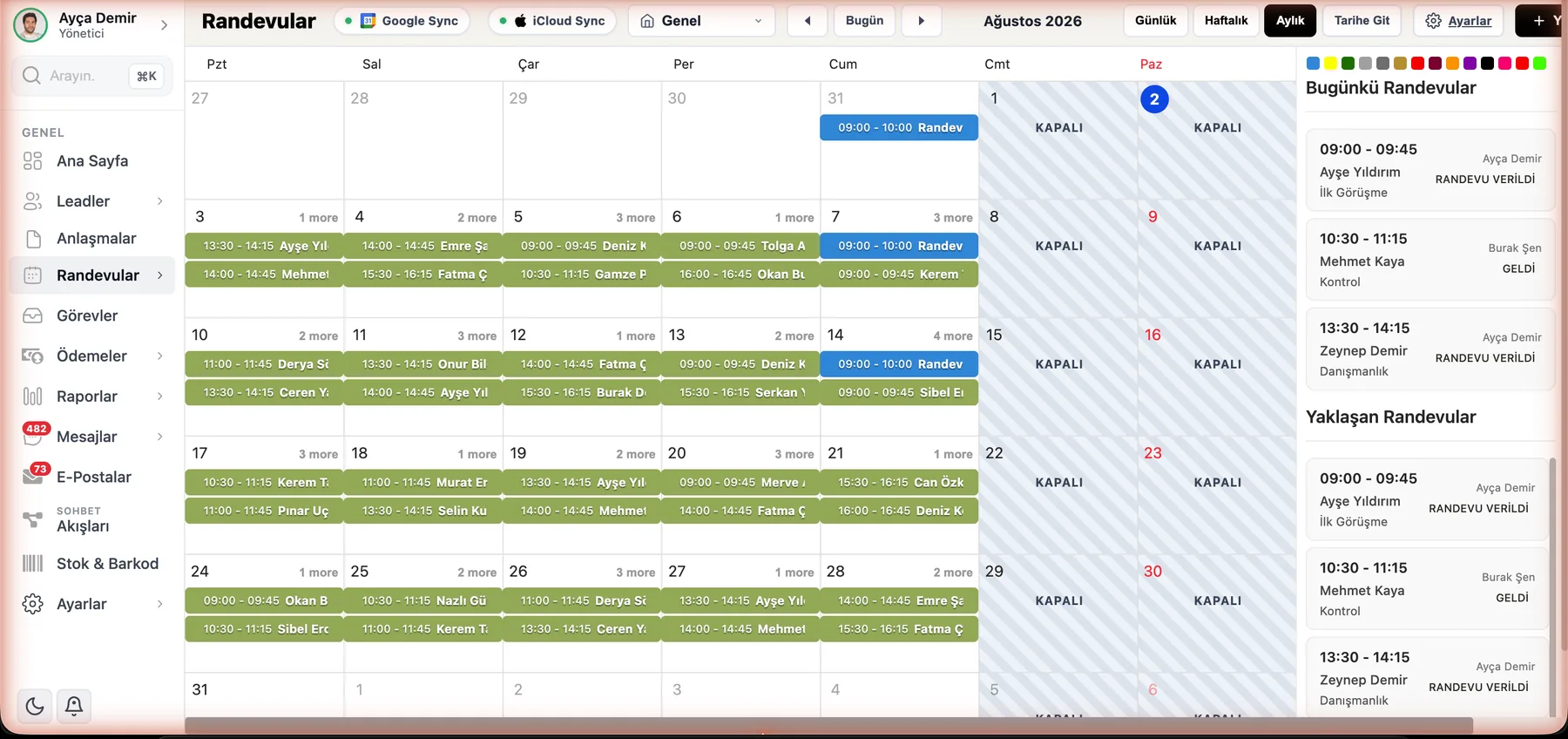
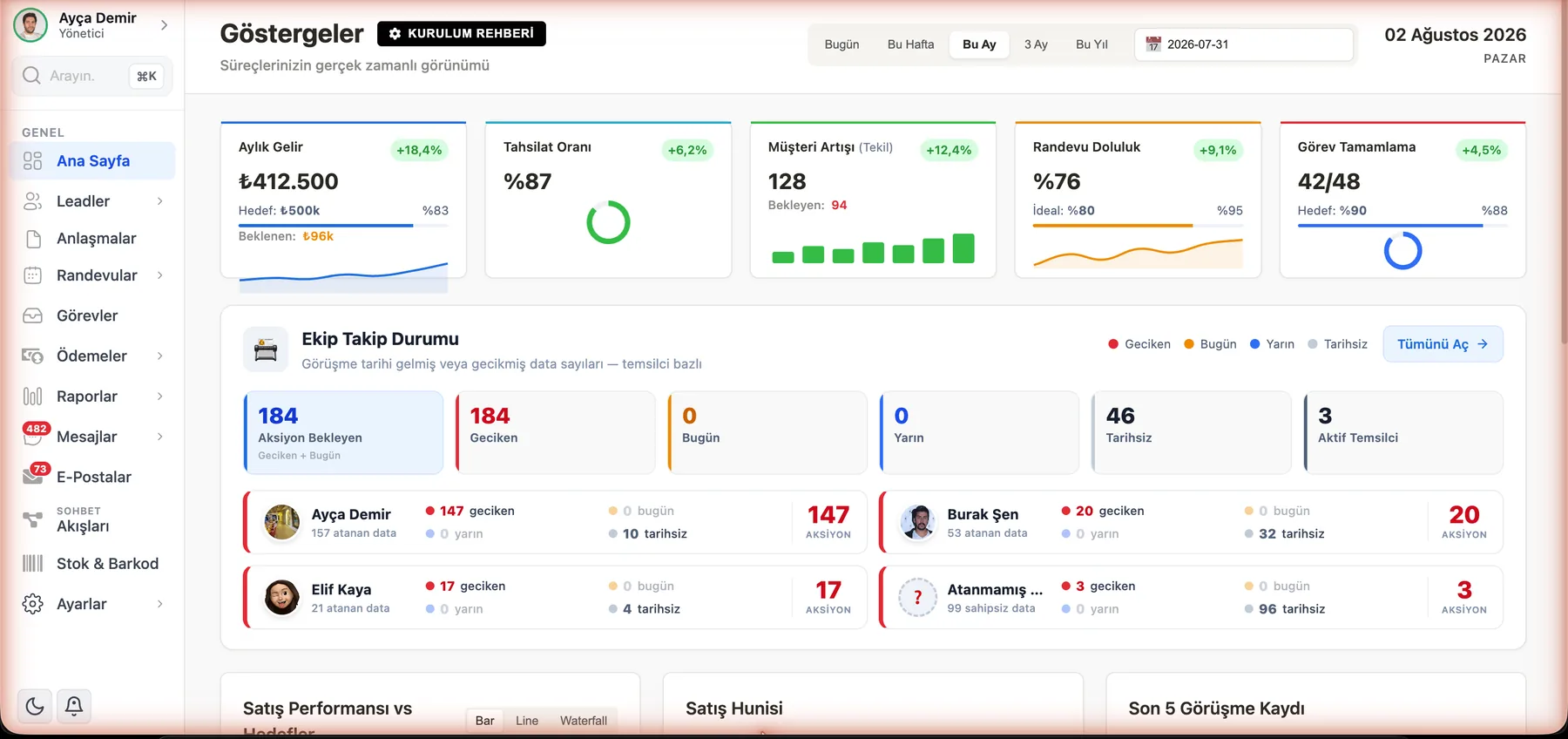
You can see all 11 screens, including the chatbot designer, WhatsApp campaigns, AI assistant and sales report, on the screen tour page, all modules on the all features page, and how they're used in real businesses in customer stories.
Our honest limits
When choosing a CRM program, you need to know what it doesn't do as well as what it does:
- No email marketing automation. If newsletters and email sequences are central to your business, products like HubSpot are stronger in this area.
- No e-Invoice (e-Fatura) or accounting module. ÖzgürKod keeps a record of payment collection and its due date; your accounting software issues the invoice.
- No self-hosted installation. It's offered only as cloud (SaaS).
- WhatsApp connection is not included in the plan price. 15,000 TL + VAT per number per year; Instagram, Messenger, Telegram, TikTok and web chat are included in the plan.
Frequently asked questions about CRM programs
What is CRM software?
CRM software is software that gathers all the information a business has about its customers — contact details, messages, meeting notes, quotes, appointments, orders and payments — in a single shared database, and lets the team follow up with every customer systematically. CRM is short for Customer Relationship Management.
Is there a difference between a CRM program and CRM software?
Functionally, no; they are two names for the same product category. “CRM program” is used in everyday language, while “CRM software” is used in more technical and corporate texts. “CRM system” is a broader term that covers the software along with the processes and rules around it. “Customer management software” usually describes the same need.
What is CRM software used for?
It serves three main purposes. (1) Institutional memory: every conversation with a customer and every price and promise given stays on one card; even if team members change, the history stays with the business. (2) Follow-up: quotes, appointments and callback promises are reminded by the system, and requests awaiting a reply show up on a list. (3) Measurement: reports show which channel and which campaign bring in customers, and at which stage a sale was lost.
Which is the best CRM software?
There is no single best CRM software for everyone; the right question should be “which one is best for my scale, channels, and budget?” Salesforce stands out for enterprise depth, HubSpot for content and email marketing, Zoho for a large app family, Bitrix24's free plan for starting at zero budget, and Pipedrive for simple sales tracking. For businesses whose customers message them on WhatsApp and Instagram and who want to manage the appointment–quote–payment collection cycle in Turkish in a single panel, ÖzgürKod is the local alternative that puts these channels at the heart of the product. ÖzgürKod is developed by the team that publishes this guide.
Is there free CRM software?
Yes. Products such as Bitrix24 and HubSpot have free plans. However, free plans are limited in number of users, record capacity, automation, and support, and you need to move to a paid tier as the business grows. A free plan is different from a time-limited free trial: a trial (e.g. 7 days with ÖzgürKod, no card details required) shows you the full product, not a limited version.
Does a small business need CRM software?
Not every small business does. If you work alone, have few customers, and all messages collect on a single phone, a well-organized Excel list can be enough for a while. But if two or more people deal with the same customers, if messages are spread across several channels, or if customers who need a call back get forgotten, CRM software makes the missed follow-ups visible. The 8-question test on this page helps you make this decision quickly.
How much does CRM software cost?
There are two main models on the market. Global products are mostly sold as per-user monthly USD licenses (entry packages around 10-25 USD, mid-market 25-100 USD, enterprise 100-500 USD and up). In Turkey's fixed TL package model, the team is included in the price; for example, ÖzgürKod 2.500 starts at around TL/month. When deciding, look not only at the monthly list price but at the 3-year total cost, including setup, data migration, integrations, message fees, and exchange rate differences.
Why should I use CRM software instead of Excel?
Excel is a good list for one person, but it falls apart as the team and the number of channels grow: different versions of the file appear, no one knows who changed what, you cannot set reminders, and WhatsApp or Instagram messages stay outside the file. CRM software turns the same list into a shared, permission-controlled system with reminders; messages, quotes, and appointments are also linked to the same customer record.
How long does CRM software setup take?
Cloud-based (SaaS) CRM software has no server setup; you open an account and start using it from your browser. What really takes time is preparing the data and building the team's habits: cleaning up the Excel list, defining fields, and connecting channels. A small team can start basic use on day one; on-premise enterprise projects that need heavy customization can take weeks or months.
Is there CRM software that works with WhatsApp?
Yes. Some CRM programs support WhatsApp through a plugin or third-party connector, while others support it natively. In ÖzgürKod, WhatsApp (official Cloud API and QR connection, multiple numbers) works in a single inbox together with Instagram DM, Messenger, Telegram, TikTok DM, and web chat; every message is linked to the relevant customer record. When choosing, always ask the question “is WhatsApp included, and who pays the per-message fee?”
Is my data safe under KVKK (Turkey's personal data protection law) in CRM software?
This depends on the product and the contract; ask the vendor the following: on what infrastructure is the data stored, and if there is a transfer abroad, on what legal basis is it made, who can access which data, are accesses logged, and who has the authority to export data? In ÖzgürKod, each business's data is kept in a separate (isolated) database; there is role-based permission, a rule that “team members see only their own customers,” and access logs; exporting the customer list requires SMS verification and company owner permission.
The best CRM program is the one your team actually uses
None of the criteria in this guide can replace ten minutes of using the product with your own customers. You can try ÖzgürKod for 7 days without giving card details, with your own WhatsApp and Instagram accounts; there's no setup fee, and our team is there to help you import your Excel list. If you don't like it, all you lose is your curiosity.
No card details required · No setup fee · Turkish-language support included in all packages
This guide is based on publicly available information as of September 2026 and on our own product inventory; it was prepared by the ÖzgürKod team and is updated regularly. The brands mentioned belong to their owners. If you see an error or outdated information, let us know and we'll fix it.