In health tourism, from message to quote, from quote to treatment, from treatment to return.
Health tourism software: patient leads from every channel, online quotes in the patient's language, deposits, travel files, hotels, transfers and treatment appointments in one panel.
A patient lead writes from an ad to WhatsApp; their card shows who will reply, where the quote stands and whether the deposit has arrived. Each sales rep talks to their own patients, and the team lead sees everyone: who answers in how many minutes, who turns inquiries into sales. After approval, you gather the ticket, passport, hotel and appointment in the same file. Handle transfers with your own vehicles or hand them to a transport company.
Whichever app a patient writes from, the message lands in the same inbox; the conversation is assigned to a sales rep and merged with the patient's card. A lead that comes from a form on your site, from Google Ads or from Google search is added to their card with its source. Unified inbox →
From ad to return flight, every step on the same card
The sales team, coordinator and clinic all look at the same patient. Who promised what, what was paid, when the patient is coming: all in one place.
No patient lead gets left on a phone call
- Unified inbox: WhatsApp, Instagram DMs and comments, Messenger, Telegram, TikTok and web chat; the team writes from the same inbox.
- Ad source: Meta lead forms and messages that come from ads; leads from the form on your site that arrive from Google Ads or Google search are also saved with their source.
- Assignment to a sales rep: a lead is assigned to a sales rep; each sales rep sees only their own patients, the team lead sees all of them. Sales team →
- Follow-up date: a lead whose callback date has passed is flagged.
Whatever language the patient writes in
- Chatbot: translate your flow into other languages and run the flow that matches the language the patient writes in.
- From message to record: next to a message asking for an appointment, click “Create appointment”; the number or e-mail in the message is saved to the card with one click.
- Tickets and passports: images the patient sends are read and suggested for the file.
- Panel in 9 languages: your colleague abroad uses the panel in their own language.
The quote in the patient's language, approved with one signature
- Line by line: treatment, hotel and transfer in the same quote; picked from the catalog or typed in by hand.
- Currency: EUR, USD, GBP or TL.
- Customer link: the patient opens the quote in their own language; they sign and approve it, or decline it and choose a reason.
- Was it seen?: the quote shows how many times the link was opened and the last time it was opened; statuses include Preparing, Sent, Approved…
Has the deposit arrived, how much is left?
- Payments linked to the quote: with type (deposit, partial payment), method and receipt.
- Remaining amount: on the patient card; if the patient has promised a payment, a reminder is set.
- Payments page: pending and overdue payment collections in a single list.
After approval: file, ticket, hotel, transfer
- Patient file: arrival and return flights, companions, luggage, special needs, document list (passport, visa, ticket).
- From ticket to file: tickets and passports sent via WhatsApp are read and processed with your approval.
- Hotel: reservation with room type, seasonal price and availability.
- Transfer: with your own vehicle and driver or an outside company; the driver marks it from their own phone.
Treatment day and after
- Appointment: room and doctor calendar; the patient replies to the WhatsApp reminder with “Coming”, “Cancel” or “Another time”.
- On time at the clinic: scheduling shows whether a transfer is arranged for each appointment.
- Clinical tools: a treatment plan on the dental chart; an operation record and patient follow-up app for hair transplants.
- After the return: once the patient has returned to their country, messages, follow-up photos and notes stay on the same card.
Each sales rep sees only their own patients; the team lead sees all of them
A few sales reps, seven channels, dozens of patient leads. Who is messaging which patient, which patient has been waiting for an answer for how many minutes, who is converting to a sale: you see it both in the conversations and in the numbers.
Conversations: everyone with their own patients
- A sales rep sees their own patients: they see only the patient leads assigned to them and their conversations; a teammate’s patients do not appear in their list. This is the default.
- The team lead sees everything: the account owner and admins see all conversations; you grant the team lead or sales manager the “Sees All” permission with a single checkbox on the Team screen.
- Who has it, for how long?: in the inbox with All, Assigned to me, Assigned to others and Unassigned counts; in each conversation the assigned sales rep and who saw the patient’s last message in how many minutes.
- Who wrote it?: every outgoing message shows the photo of the sales rep who wrote it; bot-written replies are additionally marked.
- Handover and team note: reassign a conversation to another sales rep with one click; mention your teammate with @ on the patient card, and the team note is not sent to the patient.
Who is on target, who is behind, who needs what: at a glance
The Team Board brings each sales rep’s month together on one screen: progress to target, response speed, conversion to sale, their last two weeks. The numbers come from your records, nobody fills in reports. The team lead sees their own team, the admin sees all teams.
You set a monthly target for each sales rep: number of sales, sales amount, new customers or meetings. The line on the bar shows where you should be today; based on the month-end forecast it reads On Track, At Risk or Behind, and the amount needed per day over the remaining business days is calculated. Business days are worked out from working days, public holidays and the person’s approved leave.
Assigned patients, first contact and message response time, on-time replies, sales and conversion side by side; clearly better than the team average is green, behind is red, and each sales rep gets a score from 0–100. In the indicators, click a sales rep’s number of conversations awaiting reply and those conversations open in the inbox.
Daily meetings and answered conversations on the horizontal axis, conversion to sale on the vertical; the lines are the team average. Skill coaching for those who put in a lot of effort but close little, more patients for those who work little but close well, and for those low on both, asking about blockers first: the suggestion comes ready-made.
Conversations per person per day; darker means more. Weekends and holidays are marked separately, and workdays with no conversations are visible at a glance.
One row per person: behind on target, behind the team on response time, follow-ups overdue, 1:1 not done. You log the 1:1, the action items land on the rep’s own board, and at the next 1:1 you see side by side what has changed since then. If you want, AI — using your own account — writes a team briefing from the period’s numbers.
How many open patients each person has is visible in the bar. You select patients whose follow-up is overdue, who have had no contact, or who have not been touched for days, and distribute them to whoever has the lightest load or to the person you choose. A preview comes first; a patient with an open quote is not moved, and the new rep gets a notification.
Sales and commission: calculated automatically
- Sales per rep: number and value of approved deals, plus payment collection; EUR, USD, GBP and TRY are kept separate and never added together.
- Commission plan: flat or tiered rate, a separate rate per treatment category, a monthly target; each rep gets their own plan.
- Vesting on your own rule: commission is earned when the quote is approved or as payments are collected; cancellations and refunds are deducted from commission.
- Month close and payout: you close the period, enter the commission paid, and the remaining balance is shown per person. The commission screen is visible only to the account owner and admins.
- Recognition: the rep who hits their target, the top seller of the month, the fastest responder and the rep who increased their conversations stand out on the Team Board.
After approval: ticket into the file, patient from the airport to the hotel
See for yourself what happens when a patient sends their ticket on WhatsApp: the file opens, the pickup gets scheduled, and the driver marks the passenger as picked up.
Don’t leave the details in the chat — put them in the file
Ticket and passport images the patient sends are read, and the flight, passenger and ID details are suggested to the file. The list shows which patient is missing what, by appointment.
Images from WhatsApp, Instagram, Messenger and web chat, plus files the sales rep uploads to the customer record, are read: flight number, airports, times, passenger names. You can also upload the document from the panel if you prefer.
The name on the passport, passport no, nationality, date of birth and expiry date are written to the ID record, and the customer record is updated for the patient. A passenger whose passport is valid for less than 6 months after the return date is flagged.
An empty field fills in on its own if reading confidence is high and the name matches. If the file shows a different flight, nothing changes silently: the current value is shown alongside, and “Change” is up to you.
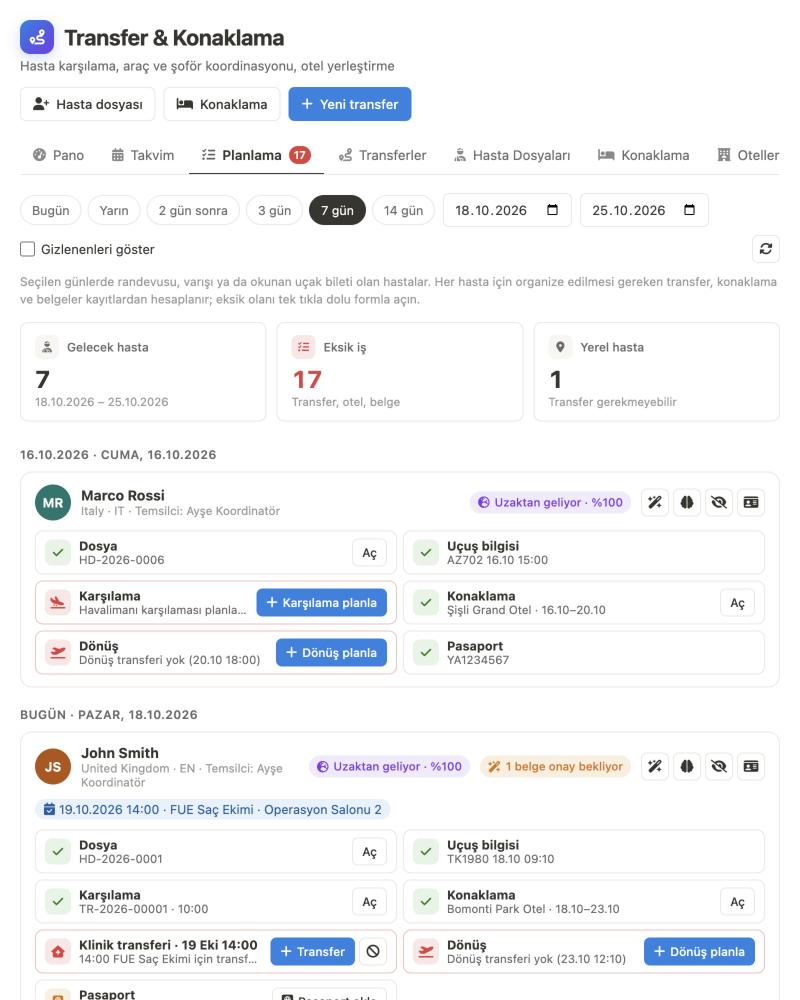
The planning tab gathers patients from appointments, files and read tickets. For each one it shows the file, flight, pickup, hotel, clinic transfer, return and passport status; anything missing opens pre-filled with one click.
A patient who lives in the same city isn’t offered a transfer or hotel. Country, language and phone number are checked; with AI on, the conversation tells you too: “I’ll come on my own,” “I’ll stay with my brother.”
No need to call and ask “Did you pick up the patient?”
Drivers see their jobs on their own phone and mark when they pick up and drop off the passenger. It lands on the coordinator panel instantly.
You don’t create a CRM account for the driver. They sign in with their phone number and a password you set; they see only the jobs assigned to them, the route, the flight and the passengers. They don’t see fees or costs. Your own drivers and an outside company’s drivers use the same panel. The calendar, welcome sign and directions are at their fingertips.
For each passenger: Picked up, No-show, Dropped off. For each stop: Arrived. The mark appears as a notification on the coordinator’s screen. If there is no signal, it is queued on the phone and sent once the connection returns, with the time it was marked.
When a new job is assigned, a time changes, a job is given to someone else, or the coordinator writes a note, the driver gets a notification on their phone. The notification does not include the patient’s name; tapping it opens the job.
The coordinator adds the conversation with the driver, updates and the precaution to be taken to the transfer; they can show it to the driver if they want. The driver taps “Read”, marks the precaution as “received” and can add notes of their own. Any open precaution on a transfer less than 24 hours away shows as a warning on the board.
The patient’s treatment under their agreement and their appointment close to the transfer day (time, service, room) can be shown to the driver, so it is clear which patient must not be late to the clinic. Because this is health data, it is off by default; an admin turns it on.
Even without vehicles, transfers stay under your control
Most health tourism companies hand transfers to a transport company or a freelance driver. That company works as part of your fleet too; when, who and from where is all on record with you.
Same setup with an outside company
- Define them as an outside vendor: add the transport company or freelance driver with the “Outside vendor” flag; the company name shows on their card.
- Send the job in one click: the time, flight, stops and passengers are prepared as a WhatsApp message; the work order is printed.
- They use the panel if they want: the company’s driver signs in to the driver panel without a CRM account and taps “Picked up”; you see it instantly.
- Fee and cost kept separate: the amount charged to the patient and the amount paid to the company are tracked per transfer.
- Planning knows: when you assign the transfer to the company, the pickup shows as “arranged” in the Planning list.
Pickup, clinic visit and return: planned to the minute
Open a pickup or return draft in one click from the patient file; stops, passengers and flights are filled in automatically.
Everything one transfer includes
- Multiple stops, multiple passengers: patients and companions can be picked up from and dropped off at separate stops; suitcases and wheelchairs are counted.
- Distance and time along the route: the route is drawn on the map, the order is optimized and the estimated end time is calculated.
- Times based on the flight: for pickups we suggest landing time plus a waiting allowance; for returns, a time counted back from departure.
- Warnings before you save: if the driver or a passenger is on another transfer at the same time, or the vehicle does not have enough capacity.
- Printable: job order and airport pickup sign.
- Patients heading the same way: two transfers are combined into one trip.
Hotels and rooms
- Hotels and room types: capacity, beds, board type, accessible room.
- Seasonal prices and availability: separate buy and sell prices for periods such as congress week.
- Linked to the patient file: check-in and check-out, nights and amount; in the same itinerary flow as transfers.
- Hotel report: room-nights, sales, cost and margin (for users with finance permission).
This is how it looks in the dashboard and on the driver’s phone
Not mockups; these are the screens themselves. Patient, driver and hotel names are sample data.


Your first patient journey in three steps
No setup. Connect your channels, enter your prices; the first quote can go to the patient the same day.
1Connect your channels
Connect your WhatsApp number, your Instagram and Facebook page, your Telegram bot, your TikTok account and the chat widget on your website. Leads from Meta ad forms come in on their own; embed the lead form on your site with one line of code, and leads from Google Ads and Google Search are saved with their source.
2Enter your prices
Add treatments, hotel and transfer items to your catalog with their currency. A quote is built from them in minutes and goes to the patient as a link.
3Open the file once the quote is approved
When the quote is approved, open the patient file: ticket, passport, hotel and transfer all in one place. Set up the airport and hotels once for transfers; add your own vehicle or an outside company.
Which ad brings in patients, which payment is still pending?
Numbers you can measure, from ad spend to signed quote and from payment collection to driver bonuses; not estimates.
From ad to cash
- Meta Ads ROI Center: spend, leads, customers, deals, CPA and ROAS per campaign.
- Google Ads and Google search: when a lead submits the form on your site, their Google Ads click (gclid) and campaign tags are written to their card; ad clicks are kept separate from organic search, and the form report shows views, submissions and conversions per source.
- Results per campaign: leads that arrive through tagged (UTM) links are listed in the metrics with registrations, sales and payment collection per campaign.
- Payment collection: pending and overdue payments; the payment commitments patients make.
- Operations: the day’s transfers on driver rows; an unassigned transfer, an arrival with no pickup or no hotel, or a precaution not taken all become alerts.
- Transfer and hotel: driver commission (trips, km, passengers, night rules), earnings statement; room-nights and margin per hotel; CSV.
Don’t leave the patient in WhatsApp, the quote in Word and the flight in Excel
The lead is on a phone, the quote is in a file, the payment is in a spreadsheet, the transfer is in a group chat. If one link breaks, the patient moves on with another company.
| WhatsApp, Word and Excel | Generic CRM | ÖzgürKod | |
|---|---|---|---|
| Patient lead | On reps' phones | Channels on separate screens | All channels in one inbox, with the ad source |
| Quote | PDF prepared and sent | Approval awaited by email | The patient opens it in their own language, signs and approves |
| Deposit | Separate spreadsheet | Not linked to the quote | Linked to the quote; remaining balance on the card |
| Flight and passport | Copied by hand from a message | Free-text notes field | Read from an image file into the record with your approval |
| Transfer | Discussed in a group chat | None | Your own vehicle or an outside company; the driver says “Picked up” |
| Sales team | Every conversation on one rep’s phone | There is a record log, not the conversation | Each rep sees their own patients, the team lead sees everyone’s; response time per person |
| Rep management | A manual spreadsheet at month end | Sales report | Progress toward targets, effort ↔ results, 1:1 coaching and commissions on one screen |
| What’s missing for tomorrow? | Spreadsheets checked one by one | The report is printed out | The planning list shows what’s missing |
Sales, coordination, drivers and management in the same system
You don’t move information between programs. Everyone does their own work and opens only as much as their permissions allow.
Sales repThe patient leads and conversations assigned to them, follow-up dates, quote and payment status. Another teammate’s patient does not appear in their list.
Team leadThe team’s targets, rep scorecards and response times; all conversations with the “See All” permission.
CoordinatorThe planning list, patient files, hotel and transfer; notes with the driver and pre-trip precautions.
DriverOnly their own tasks, on their own phone; no CRM account, no access to fees. Can be an outside company’s driver too.
ManagerAll conversations, ad return, payment collection, driver commission and hotel margin; team and permission settings.
The small but important details of health tourism
Document checklist
Passport, visa, plane ticket, hotel voucher; received, confirmed or not required, per person. A scanned document is marked as “received”.
Companions and special needs
Companions traveling with the patient, luggage, wheelchair and special notes are in the file; they are added to the transfer automatically.
Passport validity
A passenger whose passport is valid for less than 6 months after their return trip shows up as an alert before travel.
Multiple currencies
Quotes in EUR, USD, GBP or TL; hotel and transfer prices are also kept in their own currency.
9-language panel
Turkish, English, German, French, Spanish, Italian, Portuguese, Arabic and Japanese; the driver panel is in the same languages.
Team tasks
Team work on the board by person and due date; overdue work sits at the top of the “My tasks” list.
Transfer calendar
Month, week and day views; drag to change the time and driver, with a warning on conflicts.
Vehicle tracking connection
If your own fleet’s tracking system offers a REST endpoint or webhook, connect it from settings; the vehicle appears live on the board.
Starts at 2.500 ₺ / month
7-day free trial · No setup fee · Upgrade your plan any time
A single patient lead who gets a late reply signs another company’s quote.
If a single treatment package is 100,000 TL: the monthly cost of your subscription is not even a single patient.
Frequently asked questions
Have another question? Write to us and we’ll look at your transfer and accommodation flow together.
What does the health tourism CRM bring together in one panel?
Everything from the patient candidate's first message to the return flight: messages from every channel and the ad source, sales rep assignment and follow-up dates, itemized quotes and the patient's signed approval, deposits and remaining payments, the patient file (flight, passport, companion, document list), hotel reservations, transfers and treatment appointments. The sales team, coordinator, driver and manager work in the same system, seeing only what their permissions allow.
Which channels are patient candidates collected from?
WhatsApp (via Cloud API or QR), Instagram DMs and comments, Facebook Messenger, Telegram, TikTok DMs and the chat on your website are all collected in one inbox; each conversation is assigned to a rep and merged with the patient card. Leads from Meta ad forms and ad messages land in the record with their source; the Meta Ad ROI Center shows which campaign brought how many leads, customers and deals. The lead form you embed on your site with one line of code writes the Google Ads click (gclid) and campaign tags (UTM) to the patient card; Google Ads, Google search, Instagram and direct visitors appear separately in the form report.
We have more than one sales rep. How do we track who is talking to which patient?
Every patient candidate and conversation is assigned to a rep. By default a rep sees only the patients and conversations assigned to them; another team member's patients do not appear in their list. The account owner and managers see all conversations; a team lead or sales manager is given the “Sees All” permission from the Team screen. The inbox has All, Assigned to me, Assigned to others and Unassigned tabs; every conversation shows the assigned rep, and every outgoing message shows the photo of the person who sent it. The rep scorecard shows each rep's first contact and message response time, on-time reply rate, overdue follow-ups, sales and conversion side by side with the team average. In the Team Board, the team lead tracks the team's targets, pipeline and 1:1 coaching sessions.
How do we track reps' sales targets and commissions?
Each rep gets a monthly target: number of sales, sales amount, new customers or number of meetings. The Team Board shows where you should be today, the month-end forecast and what is needed per day in the remaining business days; the rep is marked On Track, At Risk or Behind. Business days are calculated from working days, public holidays and the person's approved leave. The effort ↔ result matrix shows who needs coaching and who needs more patients; 1:1 meetings and actions are logged. Commission is calculated automatically from approved deals at a fixed or tiered rate, or if you prefer a separate rate by treatment category; it is earned as the quote is approved or payment collection comes in, and cancellations and refunds are deducted. Amounts are kept separately in EUR, USD, GBP and TL.
What language do you work with foreign patients in?
The panel and the driver panel are available in 9 languages: Turkish, English, German, French, Spanish, Italian, Portuguese, Arabic and Japanese. The quote link you send to the patient opens in the contact language stored on the patient's card. You can translate your chatbot flow into other languages and run the flow that matches the language the patient writes in.
How does the quote reach the patient, and how is it approved?
You build the quote line by line: treatment, hotel and transfer can all be in the same quote. You pick a line from the catalog or type it in, and the currency can be EUR, USD, GBP or TL. With the “customer link,” the patient sees the quote on the page they receive, then signs and approves it or declines it and picks a reason. The quote shows how many times the link was opened and when it was last opened; the quote status is tracked as Draft, Sent, Approved, Declined or Revised.
How are deposits and payments tracked?
Payments are recorded against the quote: with their type (for example, deposit), method and receipt. The patient's card shows how much they have paid and the remaining amount; if the patient promises to pay, a reminder is set. On the payments page, pending and overdue payment collections are in a single list. There is no module for collecting payments from the patient online by card or for installment plans.
We get transfers from an outside company. What does the transfer part add for us?
You define the transport company or freelance driver as an “external resource”; the company name shows on the driver card. When you assign a transfer to that driver, the time, flight, stops and passengers are prepared as a WhatsApp message, and a work order is printed. If the company's driver wants to, they can open the driver panel without a CRM account and mark that they have picked up the passenger. For each transfer, the fee charged to the patient and the cost paid to the company are kept separate. The transfer module is optional; you can also use it just for the patient file, hotel and scheduling.
Do drivers need a CRM account?
No. The driver opens the driver panel in the browser on their phone, using their own phone number and a password that belongs to you; an admin generates the password on the driver card and can send it via WhatsApp if they want. The driver sees only the jobs assigned to them and does not see fees or costs. They mark when they pick up and drop off the passenger, which shows up instantly on the coordinator's screen; when the app is closed, new jobs and time changes arrive as notifications.
How are flight tickets and passport images read?
Images and PDFs that the patient sends in messages and the sales rep uploads to the customer card are read with the AI (Gemini) key defined on your account: flight number, airports and times, passenger names, passport number, nationality, date of birth and expiry date. Information is written to the file automatically only if reading confidence is high, the name matches the patient or companion, and the target field is empty; any information that conflicts with a filled field always goes to you for approval.
How do I see what's missing for patients arriving tomorrow?
The scheduling tab lists patients who have an appointment, an arrival or a read flight ticket on the days you select (today, tomorrow, in 2 days, in 7 days…). For each patient, the file, flight information, airport pickup, hotel, clinic transfer for each appointment, return and passport status are calculated from the records; anything missing opens as a filled-in form with one click. Patients living in your city are separated by country, language and phone number.
Can we also manage hotel reservations?
Yes. You define the hotels you work with, room types, seasonal purchase and sale prices and allotment; a reservation is linked to the patient file with its number of nights and amount. The hotel report shows room-nights, sales, purchase and margin. There is no direct connection to hotels' reservation systems (channel manager).
The clinic side in the same dashboard too
Whether you are an agency or work with your own clinic, the treatment-side tools have their own pages.
Don’t keep your next patient lead waiting
Connect your channels and send your first quote today. 7-day free trial, no setup fee.